How to fix: Windows Update Errors
problem: Your PC is not able to install or apply some or all Windows Updates, thus Your computer is at a risky status. When installing Windows Update, Windows displays an error message “Windows Update encountered an unknown error”. Windows Update hangs or freezes for ever. Windows Update reports error code 0xXXXXXXXX (for instance, 0x800b0100, 0x8024402f, 0x8007065b, 0x80080005, 0x80244017 or 0x8024d007).
Cause: The Windows Update Service is a Windows component used for the managing and installation of Windows Updates. Windows Update can be damaged, missing, or unregistered. When it becomes inaccessible, your PC experiences Windows Update problems.
Solution: Damaged or missing Windows Update service needs to be replaced. The PC TuneUp Maestro Windows Update Tool can manage and install Windows Updates on Your PC.

v5.0.3.209
Download Windows Update Tool
Compatibility: All Windows versions 32/64 Bit
*File Size: 3 MB, Download Time: < 1 min DSL/ Dial-Up

Fix Windows Update problems in 3 simple steps:
- Click here to download and install Windows Update Tool.
- Launch the tool, from the Fix-it Center Window click the Fix Now button to the right of the entry - "Windows Update errors"
- Follow the steps guided by the Windows Update tool to fix errors.
Why use the PC TuneUp Maestro Windows Update Tool?
PC TuneUp Maestro Windows Update tool solves Windows Update errors by searching, downloading and installing reqired Windows Update for your operating system, using our own technology. If Windows built-in Windows Update service doesn't work for you, this is a good substitute in order to keep your Windows safe.
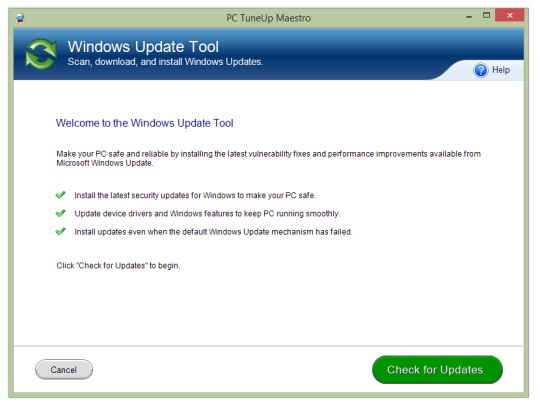
Step 1: the welcome screen of the Windows Update tool
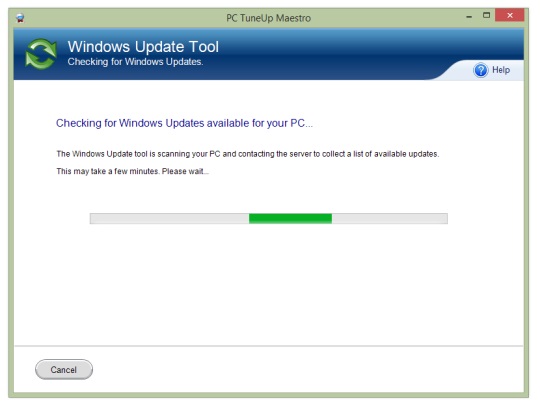
Step 2: Windows Update tool checks Windows Updates for you
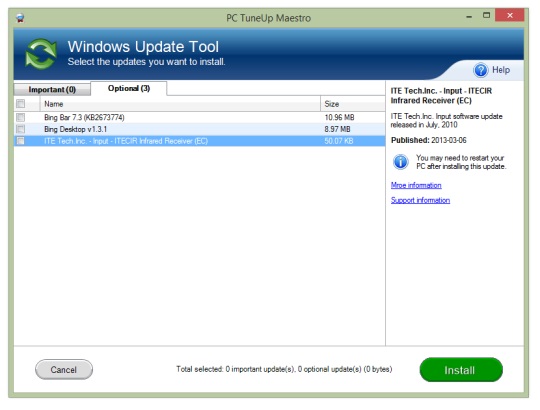
Step 3: The results screen shows all Windows Updates available for you
Simple to use yet incredibly effective PC TuneUp Maestro represents the most advanced suite of PC maintenance software tools available today. PC TuneUp Maestro uses advanced error analysis and resolution technology to fix, clean, and optimize your PC giving it peak performance and stability.
What is Windows Update
Windows Update, officially known as the Microsoft Windows Update, is a program or tool that searches and installs the latest patches on Windows operating systems. You can change Windows Update settings. If you choose "install updates automatically (Recommended)", Windows Update will automatically searches, downloads and installs all updates that your Windows operating system requires, in the background.
How to manually fix Windows Update errors
Important This section, method, or task contains steps that tell you how to modify the system settings. However, serious problems might occur if you modify the system incorrectly. Therefore, make sure that you follow these steps carefully. For added protection, back up your system settings before you modify it. Then, you can restore the system settings if a problem occurs. For more information about how to back up and restore system settings, read this article. You can use the Backup & Restore function, a free feature provided by PC TuneUp Maestro, to backup and restore system files with ease.
If you encounter Windows Update problems on Windows 7 or over, you can use the built-in Windows Update troubleshooter to repair them. You can find this tool by opening Control Panel, clicking Find and fix problems, and clicking Fix problems with Windows Update.
Recommendation for Windows Update errors
If you require assistance with applying the technical resolutions provided above, we recommend you download, install and register PC TuneUp Maestro. Registered users of PC TuneUp Maestro receive Professional PC Support Service, through which our PC Technical Support Specialists will provide you direct help with fixing Windows Update errors.
Like Windows Update errors, your PC may also have other performance or stability issues that need to be identified and addressed. You can download PC TuneUp Maestro and conduct a free PC scan to discover PC optimization opportunities. Combined with our Professional PC Support Service, PC TuneUp Maestro provides a comprehensive solution to your need for optimal PC performance.
v5.0.3.209
Download Windows Update Repair Tool
Compatibility: All Windows versions 32/64 Bit
*File Size: 3 MB, Download Time: < 1 min DSL/ Dial-Up
Posted by: Andy T.
Last updated: March 20, 2026
Last updated: March 20, 2026



Operating Systems Supported
- Windows 10
- Windows 8
- Windows 7
- Windows Vista (SP-2)
- Windows XP (SP-3)
Minimum System Requirements
- 50 MB of free hard drive space
- Internet Explorer 6 and above
- Administrative access rights